Revealing Hidden Friction in a CMS Authoring Through Eye-Tracking
Identified usability breakdowns through behavioral evidence and redesigned core interactions to improve clarity and author confidence.
Enterprise CMS
Usability Testing
Eye-Tracking

MY ROLE
UX Researcher Project Manager
TEAM
Gloria Yang (Me) Atharva Nayak Grace Ho Karla Santamaria
CLIENT
Gutenberg Technology
TIMELINE
3 months, Sep - Dec 2025
TOOLS
GT CMS, Tobii, Private Panel, Zoom, Figma, Google Sheets, Google Form
OVERVIEW
The Gutenberg Technology Course Management System (CMS) supports complex, structured content authoring, but new authors struggled with early project setup and content creation. Misalignment between user expectations and system workflows created onboarding friction and reduced confidence.
To identify where breakdowns occurred, our team conducted nine moderated usability studies using Tobii eye tracking. I led the analysis to uncover where users hesitated, misunderstood system structure, or took actions that reflected mismatches between their mental models and the system during project setup and authoring.
Based on these findings, I designed evidence-based UX recommendations and high-fidelity mockups that clarified system structure, reduced onboarding friction, and improved the overall authoring experience.
A clearer, more confident authoring experience built for scale.
Project Setup
Default Page Clarity
What is GT CMS?
Gutenberg Technology’s Course Management System (CMS) is an authoring platform that enables users to create, structure, and publish digital learning content, including online textbooks, courses, and training materials. As GT expands its reach across education, publishing, and corporate learning, the CMS must support a broader range of authors with varying levels of technical expertise.
Our client partnered with us to evaluate the usability of the authoring experience, identify friction points that make onboarding challenging, and explore opportunities to make the platform more intuitive, especially as they integrate generative AI to streamline content creation.

Gif of the Current GT CMS Platform
Why this problem mattered?
During our kickoff conversation, the GT team shared long-standing concerns about how authors struggled with the CMS's complexity. We focused on four areas that directly impacted onboarding, authoring efficiency, and the system’s ability to scale:
Table of Contents Clarity
Whether authors understood the TOC structure and could reorganize content with confidence
Starting from Scratch
How easily authors could create projects without relying on predefined templates
Drag-and-Drop Interactions
Whether drag-and-drop interactions was intuitive, discoverable, and predictable
Generate with AI
How the authoring experience could evolve to support AI-assisted content creation
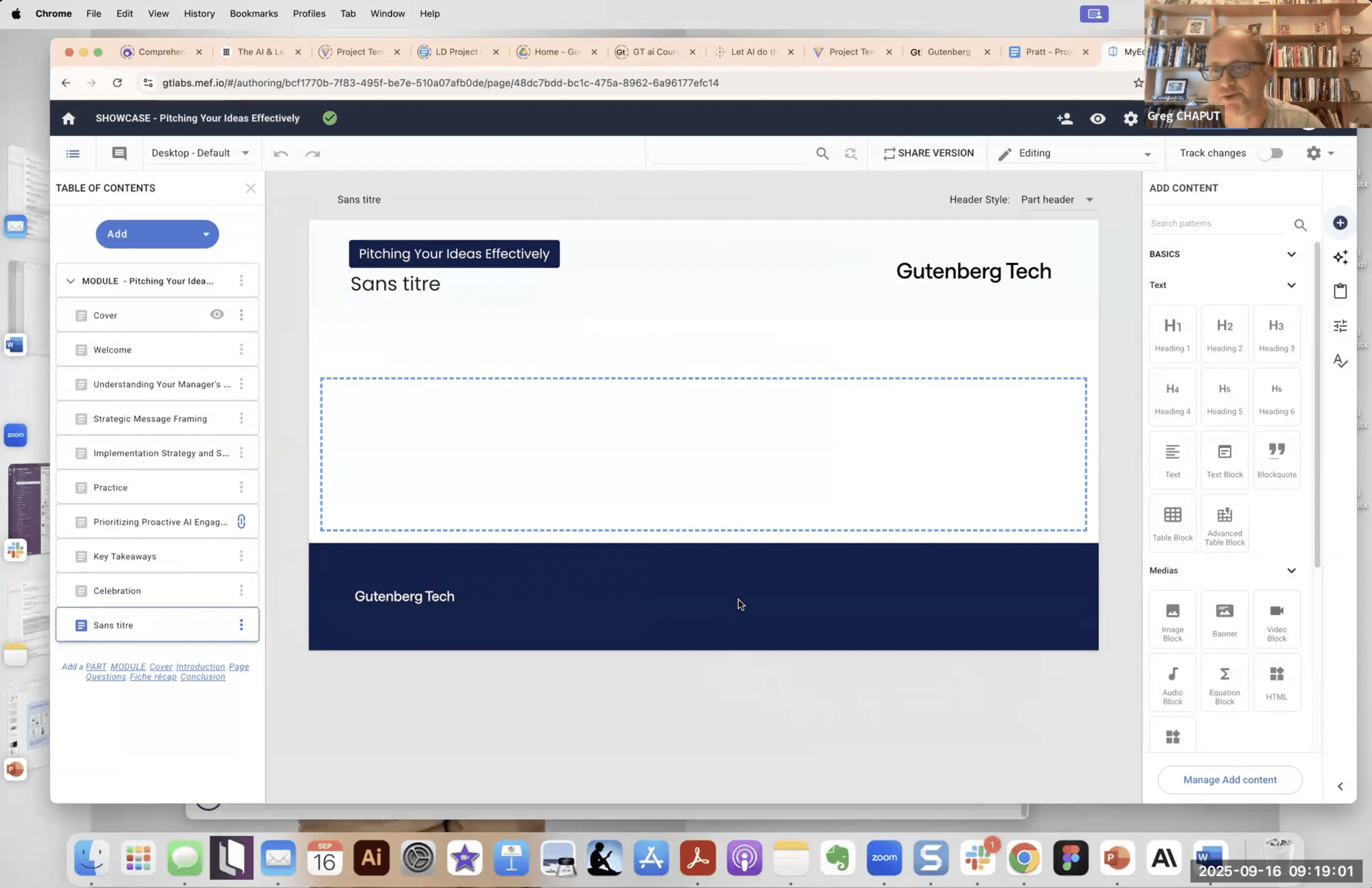
Screenshot from the client kickoff meeting, illustrating how authors currently create and structure content in the CMS.
Constraints that shaped the research
During the study, we encountered technical limitations that influenced how we collected and interpreted data.
Eye-Tracking Limitations in a Dynamic CMS
GT’s CMS generates a new URL for each project or page, which prevented Tobii from consistently anchoring Areas of Interest across sessions. As a result, we relied more heavily on manual annotation, behavioral observation, and session replay to interpret user intent.
Limited In-Product Analytics
Although the CMS used Google Analytics, editor-level behaviors were not reliably tracked. This limited our ability to use usage metrics and reinforced the need for qualitative methods, including task analysis, gaze patterns, and observed behaviors, to identify friction points.
The objective was to study the use of the Table of Contents (TOC), Authoring from Scratch, and the functionality of the Drag-and-Drop Interactions in CMS.
We conducted a structured usability study to understand how authors create, organize, and manage content in the GT CMS. After aligning on goals during kickoff, we ran moderated eye-tracking sessions, analyzed behavioral and attitudinal data, and translated findings into clear design recommendations grounded in observed behavior.
Methods used
Moderated Eye-Tracking
Observed real authoring behavior and hesitation patterns.
Retrospective Think-Aloud (RTA)
Revealed user intent and mental models behind actions.
System Usability Scale (SUS)
Benchmarked perceived usability against industry standards.
Observed authoring behavior
Through nine moderated eye-tracking sessions, we observed how authors navigated project setup, structured content in the Table of Contents, and interacted with drag-and-drop components.
Gaze patterns and task breakdowns revealed unclear system cues, mismatched mental models, and moments where user confidence dropped during key authoring steps.
These observations directly informed the design improvements that followed.

Gaze Plots from Our Study
What the System Usability Scale (SUS) scores revealed?
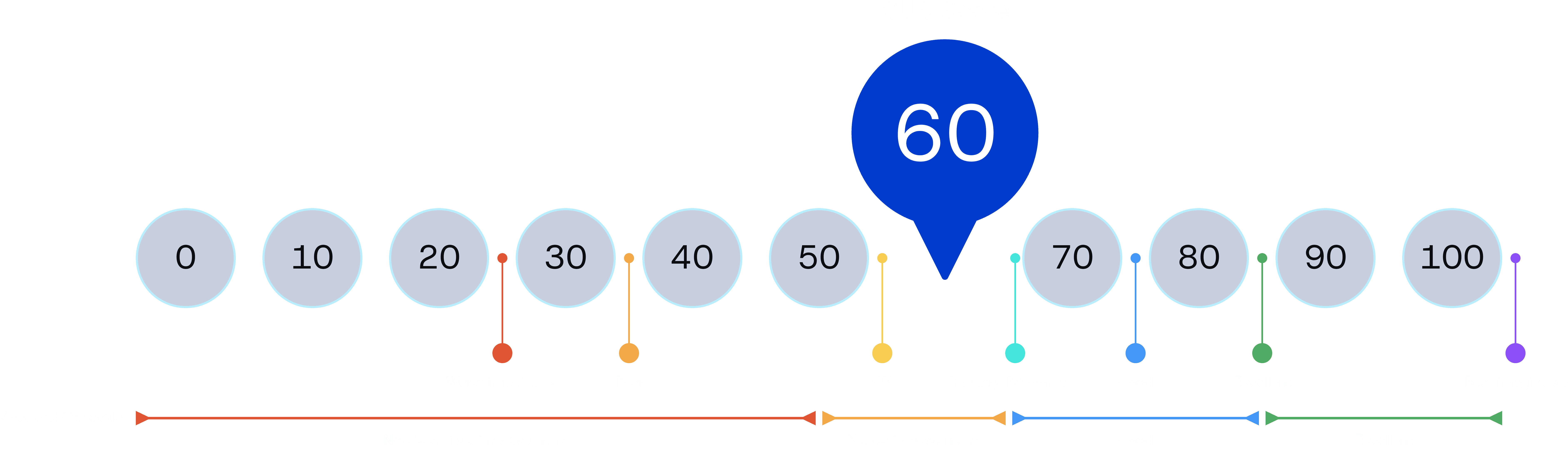
SUS Score: 60 (Below Industry Benchmark of 68)
While users described the CMS as familiar, the score revealed friction during real authoring tasks. The system was learnable, but not yet efficient or intuitive in practice.
Where the authoring experience broke down?
Overall, our findings revealed that the CMS feels learnable and familiar, but usability challenges persist, highlighting clear opportunities to improve clarity, discoverability, and the overall authoring experience.
INSIGHT 1
Drag-and-drop in the TOC aligned with user expectations but lacked clear affordances
8 of 9 participants successfully reordered pages using drag-and-drop, confirming that the interaction matched their mental model.
However, hesitation patterns and participant comments revealed uncertainty due to missing visual cues indicating what was draggable and where items could be dropped.
The interaction was conceptually intuitive, but visually under-signaled.
“It’s pretty intuitive to reorder things by dragging them, but there isn’t an icon here to mention that it is draggable.”
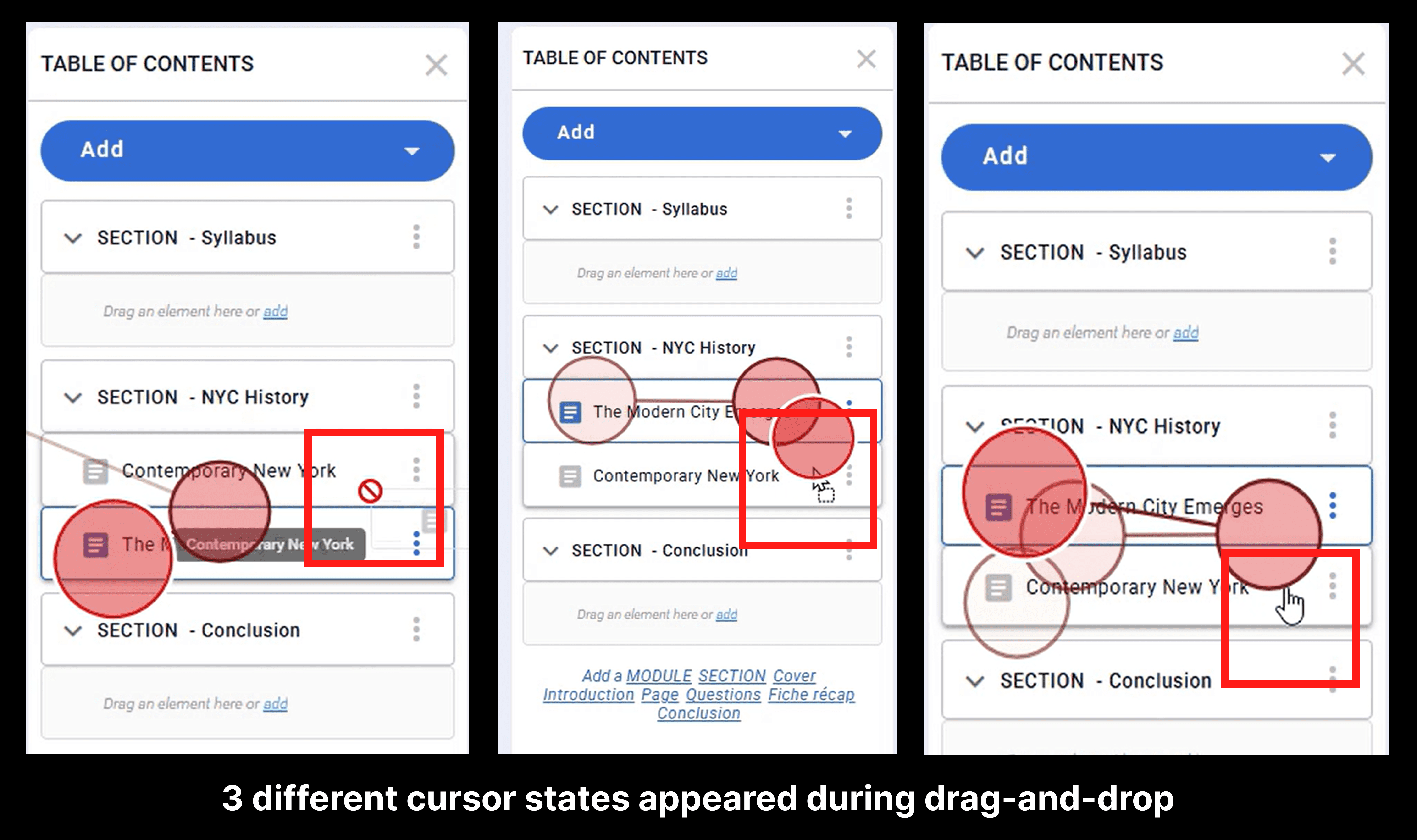
During testing, three inconsistent cursor states appeared, none aligning with standard drag indicators. This inconsistency introduced momentary confusion and reduced user confidence.
RECOMMENDATION 1
Standardize drag cues and reinforce interaction feedback
To reduce hesitation and increase user confidence, we recommend:
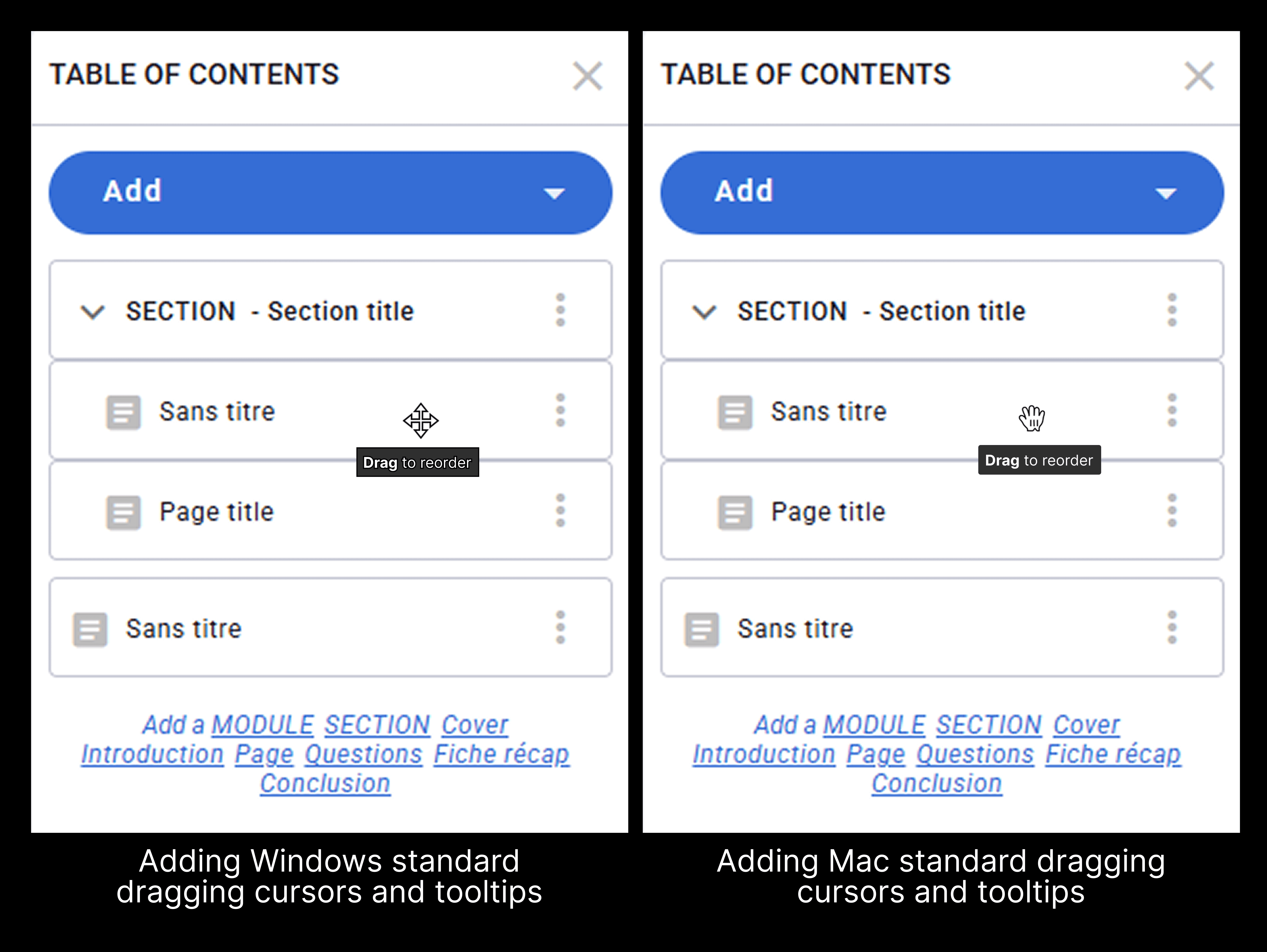
Adopting platform-standard drag cursors for both Mac and Windows
Adding a “Drag to reorder” tooltip on hover
These consistent cues make the interaction immediately recognizable, predictable, and aligned with user expectations.
INSIGHT 2
Users were confused with editing in the TOC, leading disorganization in the TOC
3 of 9 participants misinterpreted the TOC hierarchy, frequently adding a page instead of a section.
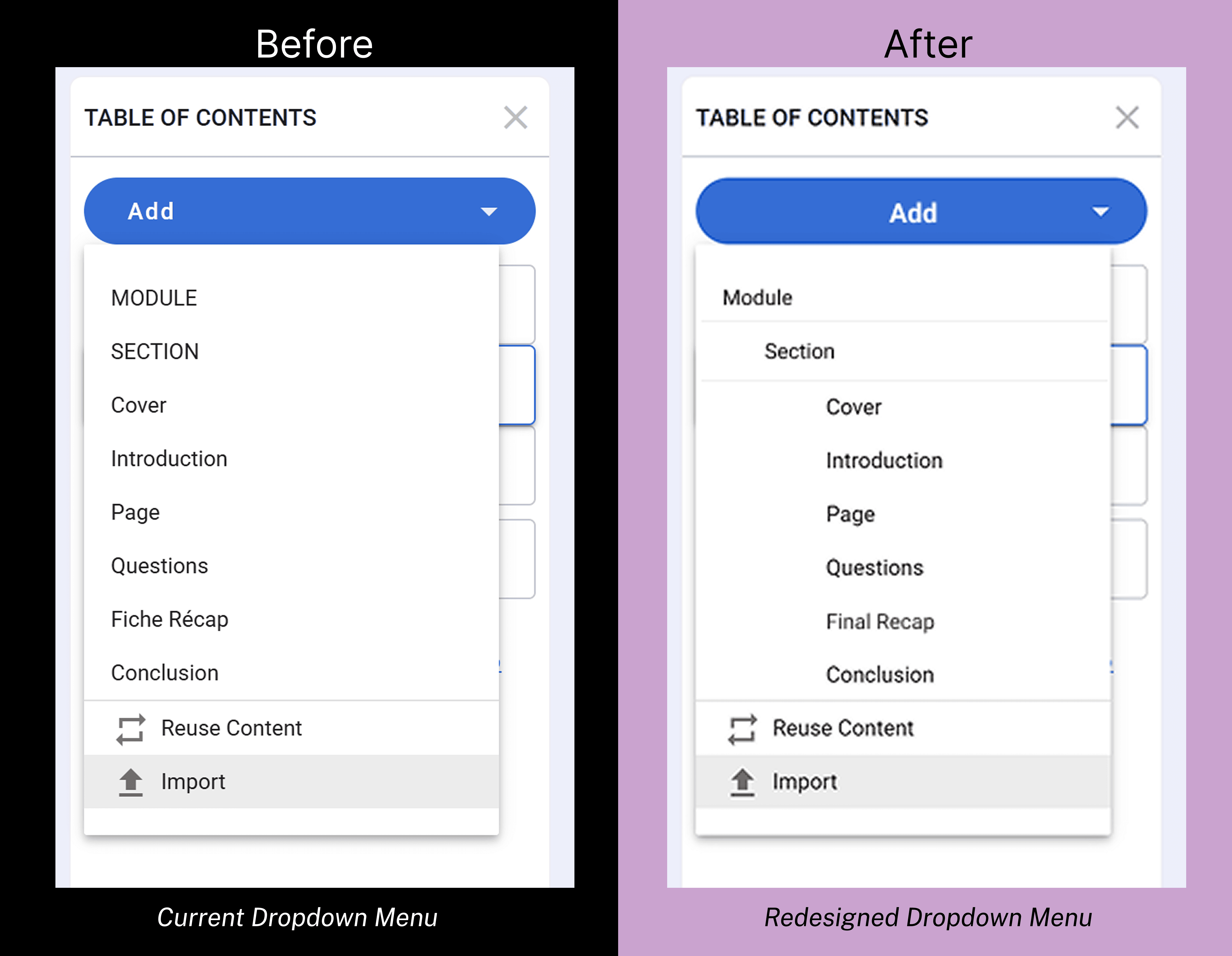
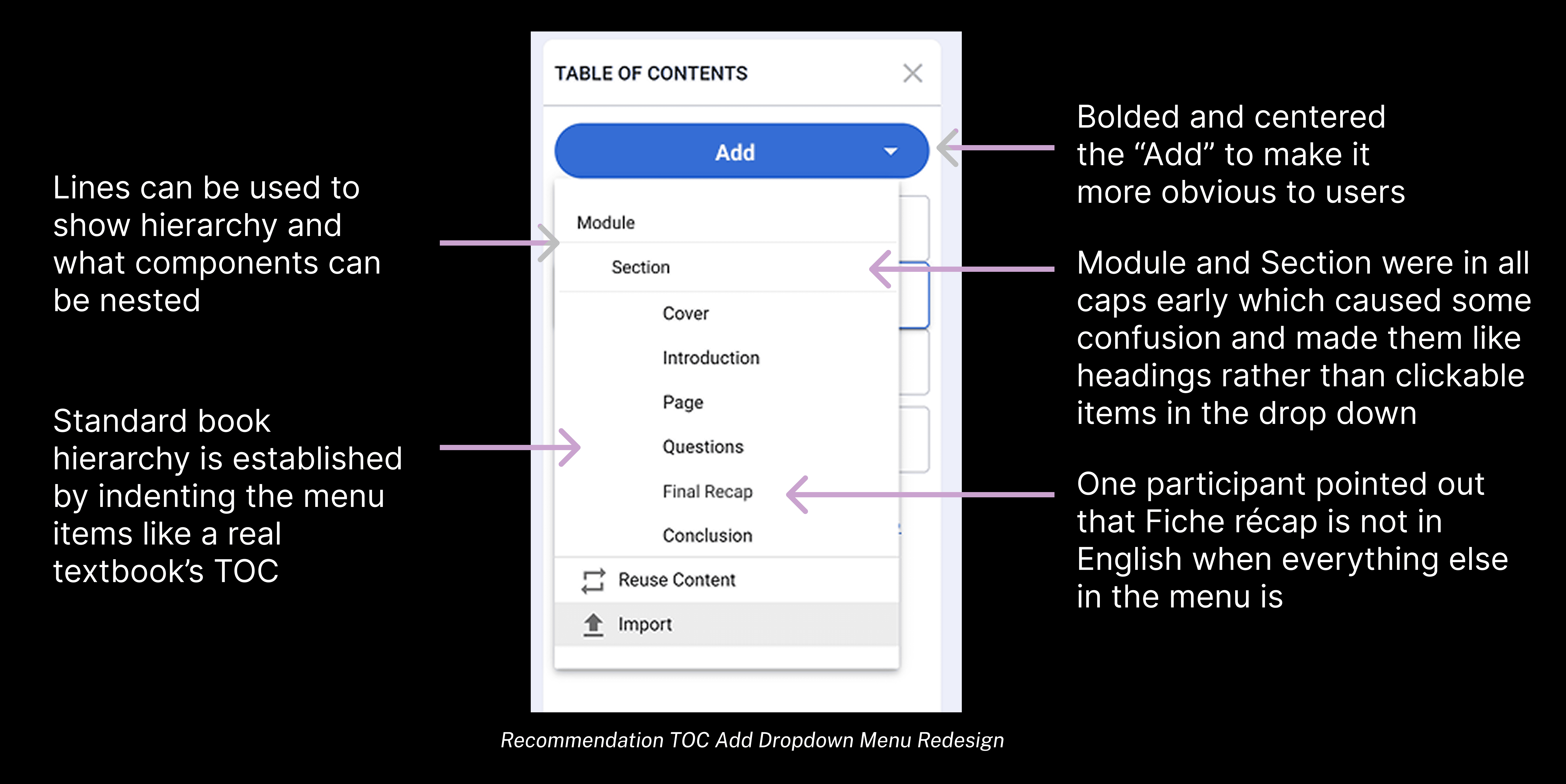
Confusion stemmed from inconsistent terminology, unclear visual hierarchy, and labels that did not align with users’ mental models. Participants struggled to distinguish structural elements from content-level items, leading to misplaced pages and fragmented organization.
“I’m not sure if I’m adding a new page or something inside this page. These labels don’t really tell me what’s happening.”
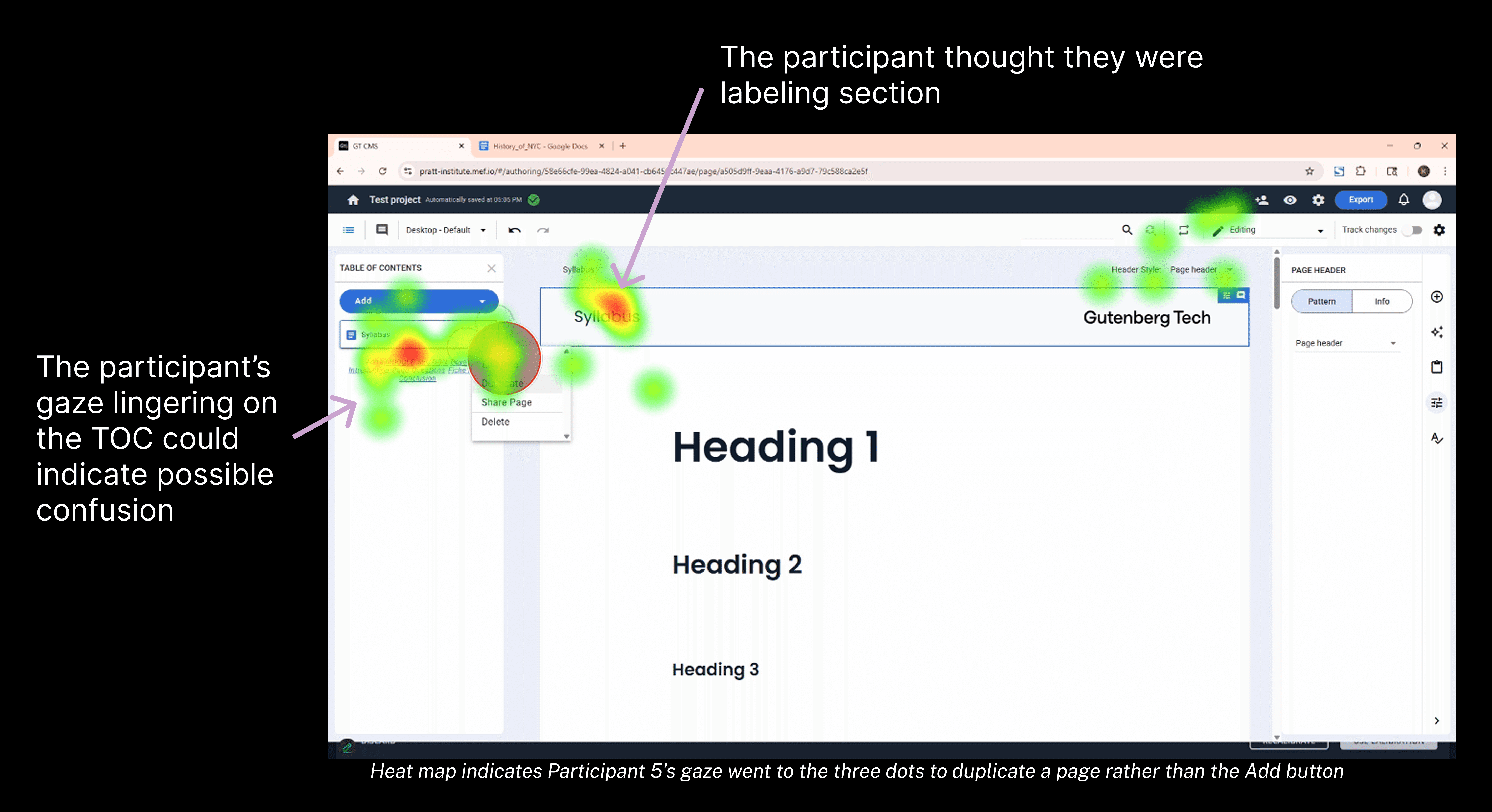
Below gaze replay showed hesitation around the Add dropdown and menu options, indicating uncertainty during structural decisions. The TOC did not clearly communicate hierarchy, nesting rules, or the relationship between modules, sections, and pages.
“What bothered me was the fact that section was in all caps and the rest of stuff was just lower case.”

Gaze replay shows that Participant 3 opened the menu and selected Pages despite seeing Sections
RECOMMENDATION 2
Clarify hierarchy and align terminology with user mental models
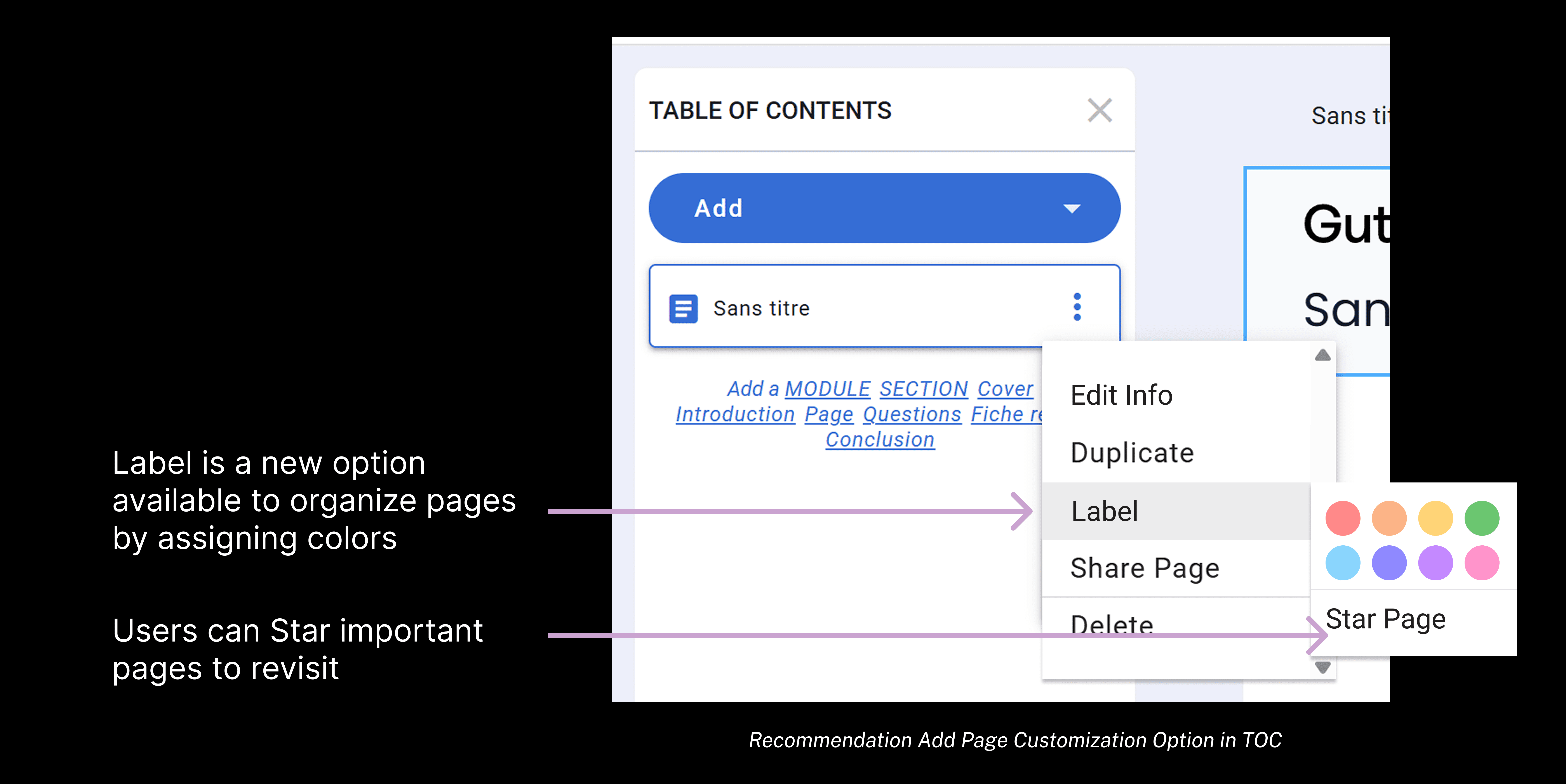
“Adding stars or colored tags to the TOC could be helpful if people have a lot of content.”
FINDING 3
Users were confused during project setup, creating early friction
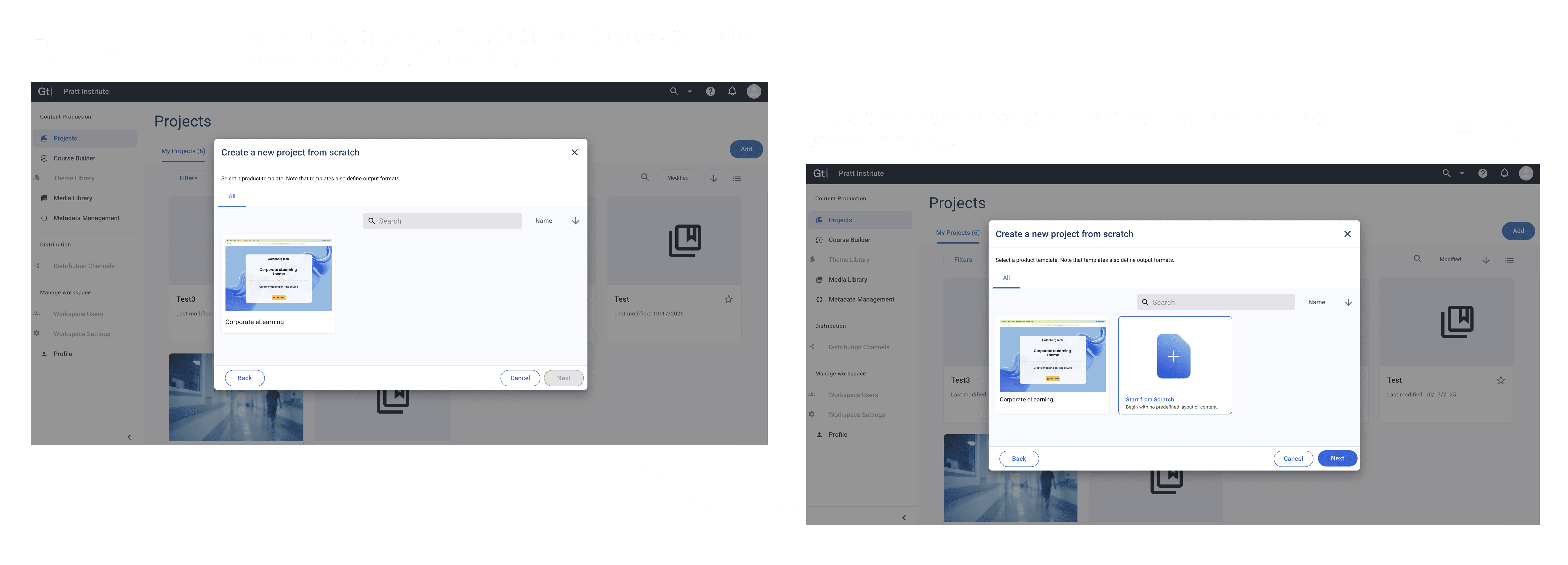
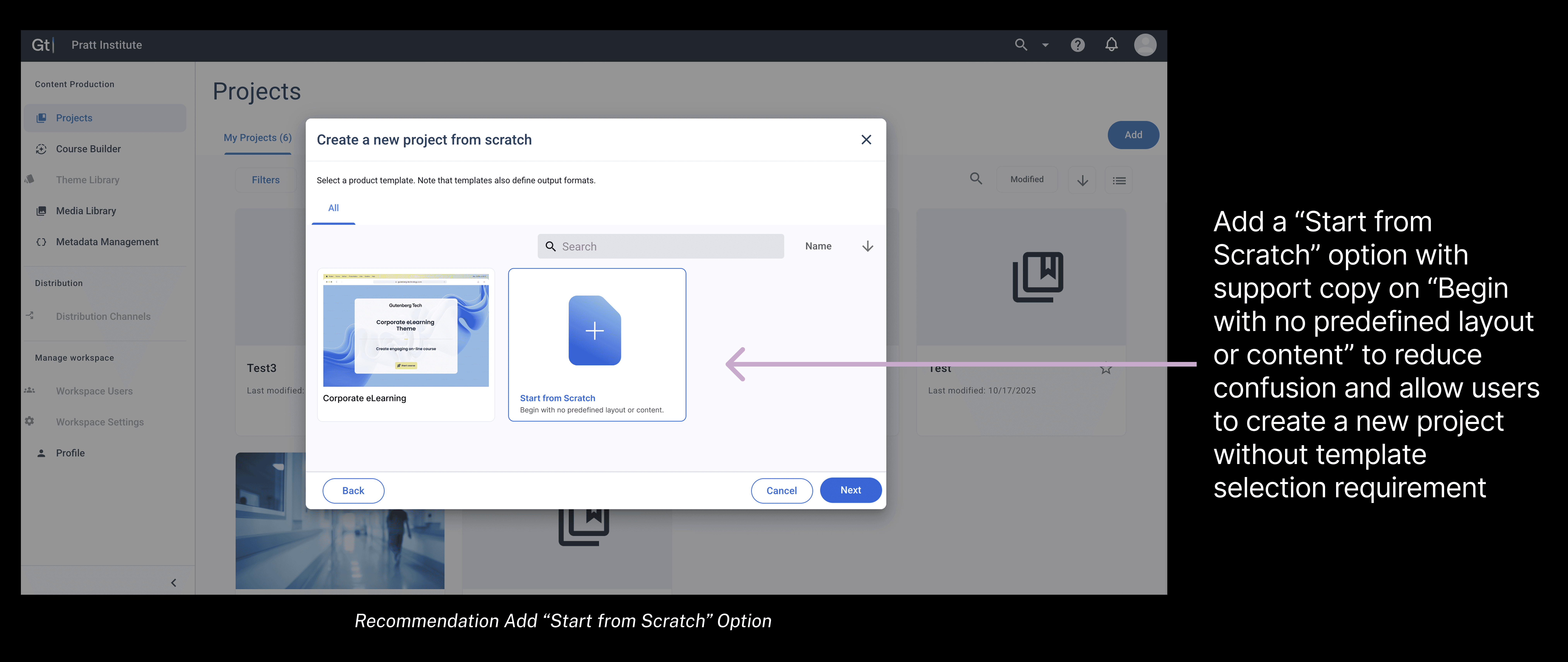
Users encountered immediate confusion at the start of the authoring flow. The label “create a project from scratch” conflicted with the mandatory template selection step, leaving participants unsure why they had to choose a template, especially when only one option was available. This mismatch disrupted onboarding, increased cognitive load, and made the CMS feel less intuitive from the very first interaction.
8 out of 9 participants were new to GT CMS, and 6 struggled to understand why template selection was required.
“Select template but there’s just 1 template so… i just went ahead with it because i didnt know otherwise”
The onboarding flow signaled flexibility, but enforced constraint — undermining user confidence early in the experience.

Gaze Replay from Participant 5 shows confusion caused by the mismatch between “create a project from scratch” and being required to choose the only available template.
RECOMMENDATION 3:
Adding a "Start from Scratch" option to reduce confusion and allowing users to create without template requirement
FINDING 4:
Users misinterpreted the system-generated default page, slowing the authoring workflow
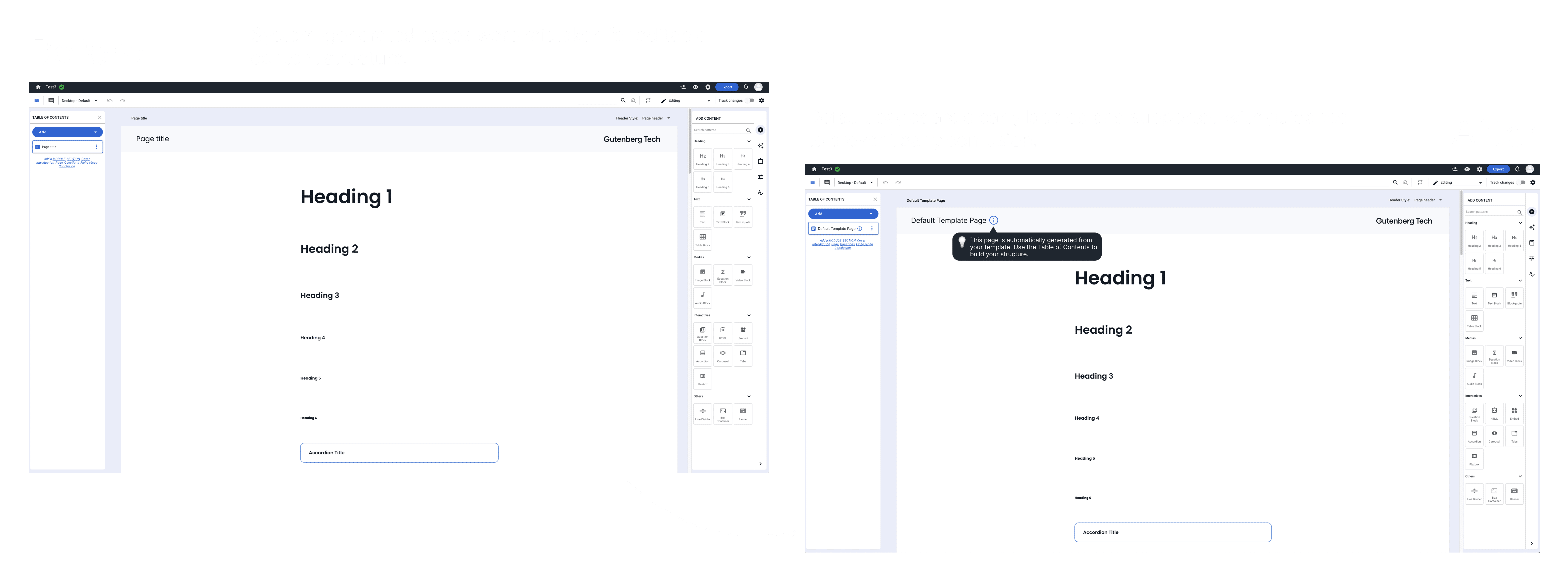
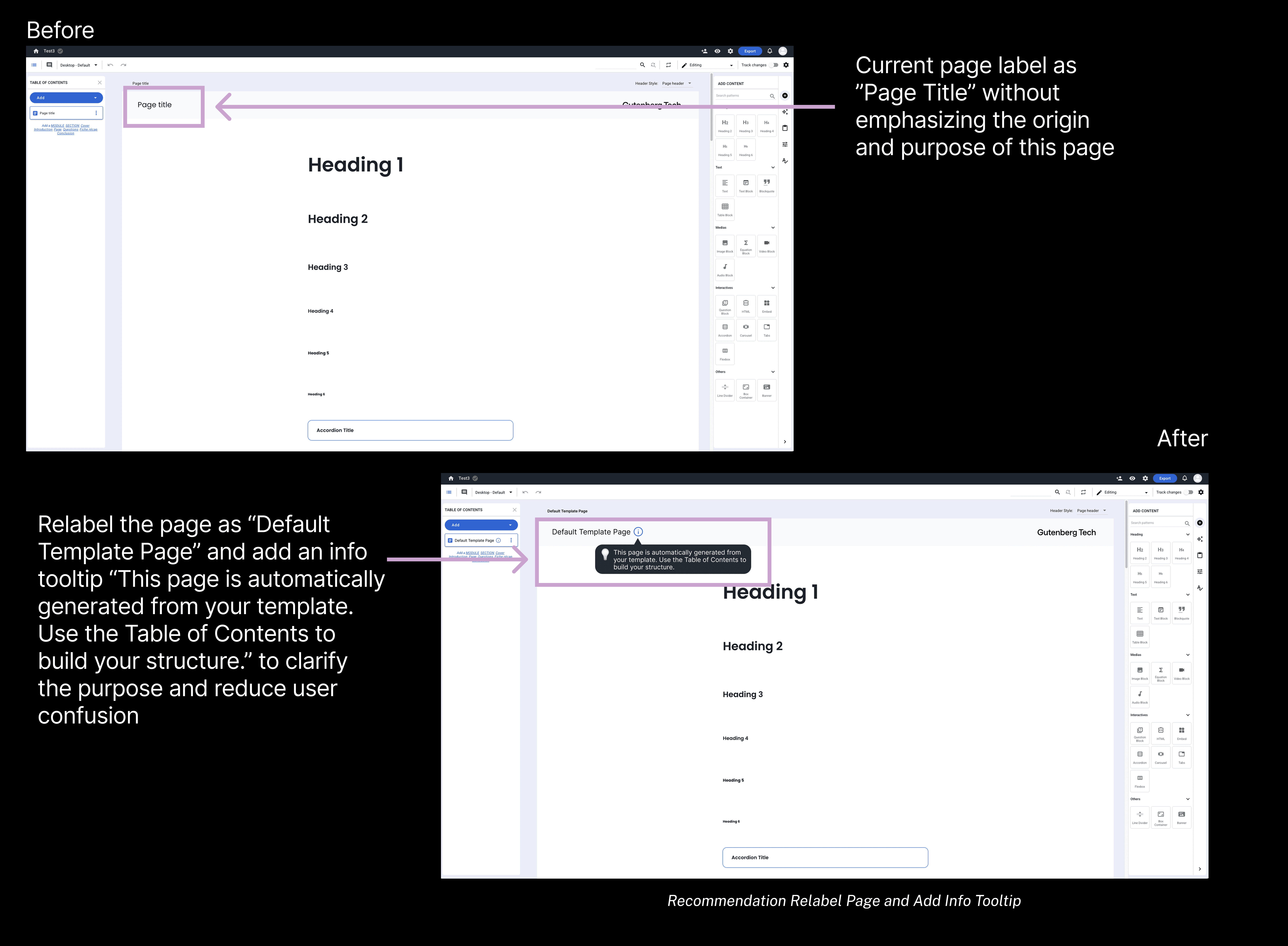
Users frequently misunderstood the purpose of the system-generated default page. Many interpreted its heading blocks as actual sections of their project rather than placeholder content. This misinterpretation led users to begin editing the page directly instead of structuring their project in the Table of Contents (TOC), which significantly slowed progress and disrupted the intended workflow.
5 out of 9 participants mistook the system-generated default page for the actual project structure, using its heading blocks as sections.
0.7
Task 1 Success Rate
(lowest across all tasks)
4.6
minutes
Task 1 Avg. Completion Time
(highest across all tasks)
“At first, I was confused with as to what this page was. Then I realized it must have come from the template that I was using.”

Gaze Replay from Participant 2 shows direct editing the system-generated default page
RECOMMENDATION 4
Relabeling the system-generated page and adding an info tooltip to clarify its purpose
FINDING 5
Drag-and-Drop to add content was not discoverable, making organizing work difficult
5 out of 9 participants participants clicked content blocks instead of dragging, showing that the intended drag-and-drop interaction was not discoverable.
“On other websites they write something to tell the user to drag the content, but nothing mentioned here.”
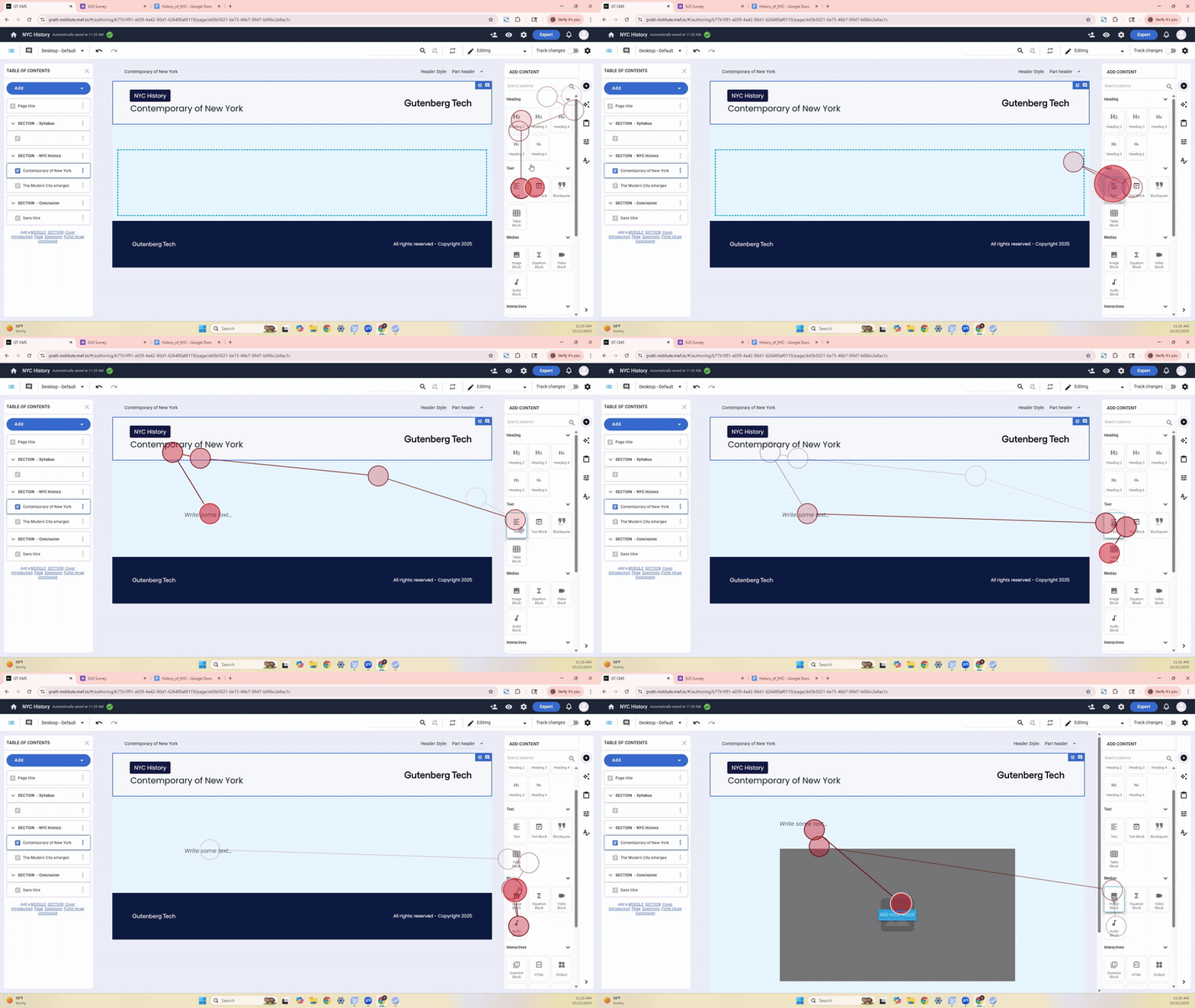
Gaze Replay from Participant 4 shows repeated clicking on content blocks instead of dragging.
RECOMMENDATION 5
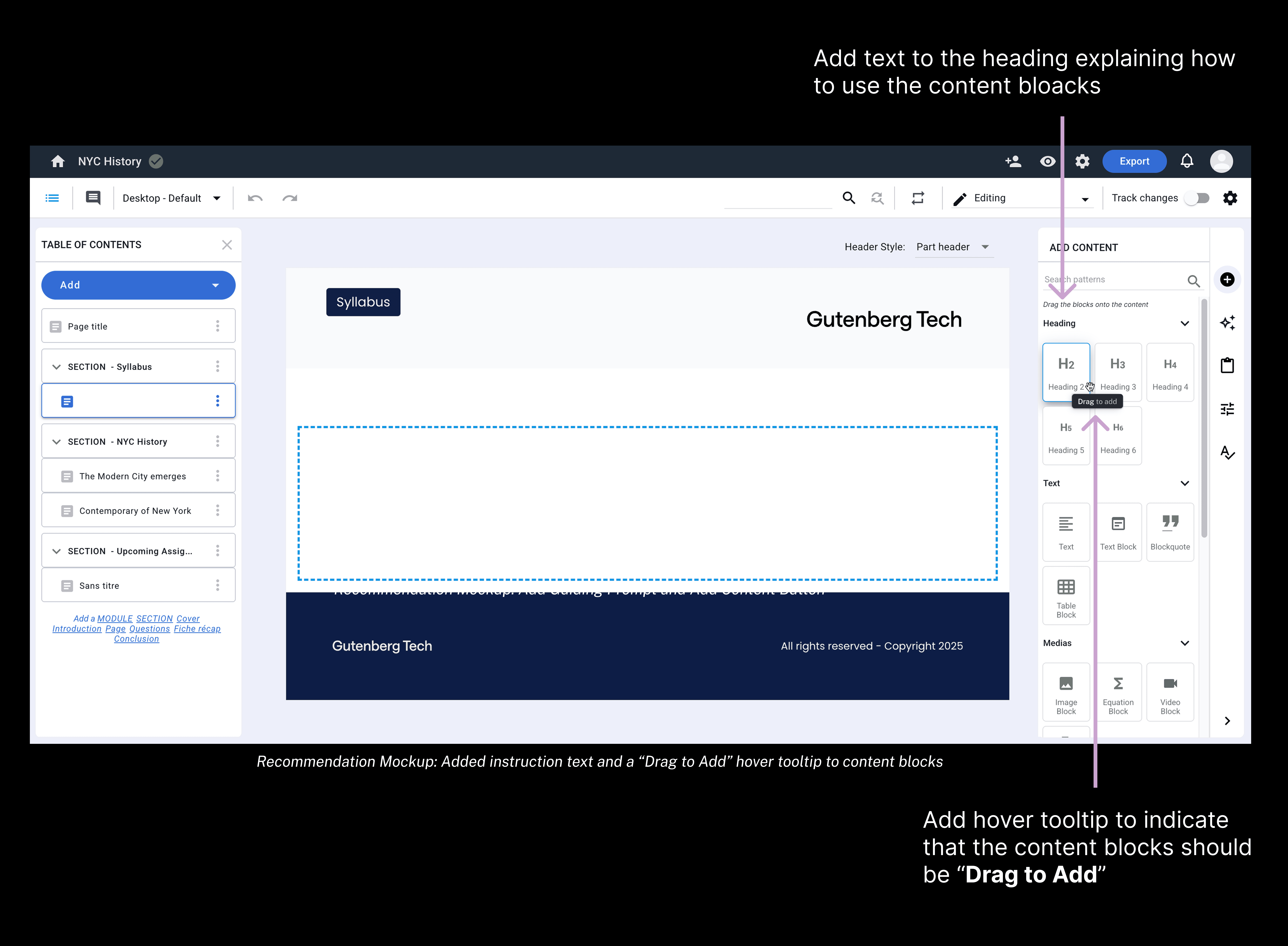
Add instruction and hover tooltip to clarify “Drag to Add” function in the right panel
Bringing the results back to our client
We presented our findings and recommendations to the GT team during a final readout, walking them through the key usability breakdowns, supporting evidence, and proposed design improvements. After the presentation, we shared a follow-up email that included all final deliverables—our slide deck, session recordings, highlight reels, rainbow spreadsheets, recommendation mockups, and research documentation—ensuring the team had everything needed to continue the work internally.
The client expressed that the insights were timely and valuable, especially as they prepare to refactor the authoring flow in the coming year.
“Great to have a fresh view on something we’re so accustomed to, especially because we’re hoping to refactor our creation flow next year. This is going to be very useful for us for our upcoming work.”
— Gutenberg Technology Team
What's next for GT?
We recommend that GT conduct A/B testing on the proposed interaction improvements, such as enhanced TOC cues and a streamlined project setup, to validate their impact and inform future development.
What I learned from this project?
Quantitative + Qualitative = Stronger Insights
This project showed me how much stronger insights become when quantitative and qualitative data work together. Quantitative data revealed where, how often, and how severe issues were, while qualitative data explained why those issues occurred. Using both methods together proved to be the most powerful way to understand the user experience and created a complete, actionable picture of improvements that resonated strongly with the client.